TASSEL 5 Pipeline Tutorial
Info
This tutorial explains how the TASSEL command-line pipeline works and walks through building your own analyses. It focuses on the concepts of plugins, forks, and how data flows between them, so that the individual flags in the TASSEL 5 Pipeline (CLI) reference make sense.
What is the pipeline?
TASSEL can be driven two ways: interactively through the GUI, or from the command line through the pipeline. The pipeline lets you chain analysis steps together into a single reproducible command, which is ideal for scripting, batch jobs, and running on servers or clusters where no display is available.
Launch the pipeline with the wrapper script for your platform:
| Platform | Script |
|---|---|
| UNIX / macOS | ./run_pipeline.pl |
| Windows | run_pipeline.bat |
Tip
The examples below use ./run_pipeline.pl. On Windows, substitute
run_pipeline.bat. To launch the GUI while still running a pipeline, use
start_tassel.pl / start_tassel.bat instead.
Core concept: plugins chained together
A pipeline is an ordered sequence of plugins. Each plugin performs one step (loading data, filtering, an analysis, exporting results), and the output of one plugin becomes the input of the next.

Reading a command left to right therefore reads like the data flow: load a file, filter it, analyze it, export it.
./run_pipeline.pl -importGuess mdp_genotype.hmp.txt \
    -FilterSiteBuilderPlugin -siteMinAlleleFreq 0.01 -endPlugin \
    -export filtered_genotype
Here the genotype file is loaded, passed to a filter, and the filtered result is exported.
Plugin syntax
TASSEL commands use two styles of flags. Both can appear in the same pipeline.
Self-describing plugins (preferred)
Most modern plugins follow the self-describing design. You name the plugin,
list its parameters, and close it with -endPlugin:
For example:
The -endPlugin flag marks where that plugin's parameters stop, so TASSEL knows
which arguments belong to it.
Legacy flags
Some older, convenience flags do not use -endPlugin. They take their
argument directly. Common examples:
| Flag | Purpose |
|---|---|
-importGuess <file> |
Load a file, guessing its format |
-intersect |
Join input datasets by their common taxa |
-export <file> |
Write the current dataset to a file |
Note
A single pipeline mixes both styles freely — for instance -importGuess
(legacy) feeding a -FilterSiteBuilderPlugin ... -endPlugin
(self-describing).
Discovering plugins and parameters
You do not need to memorize plugin names or parameters. Ask TASSEL directly:
# List every self-describing plugin
./run_pipeline.pl -ListPlugins

# List plugins together with their usage / parameters
./run_pipeline.pl -ListPlugins -usage true

# Show help for one plugin
./run_pipeline.pl -FixedEffectLMPlugin -help
The full set of flags, including the legacy ones, is documented in the TASSEL 5 Pipeline (CLI) reference.
Forks: running steps in parallel
Real analyses often need more than one independent chain of steps — for
example, loading genotypes in one chain and phenotypes in another. Each chain is
called a fork, declared with -fork<id> where <id> is a number or word
(no space after -fork).
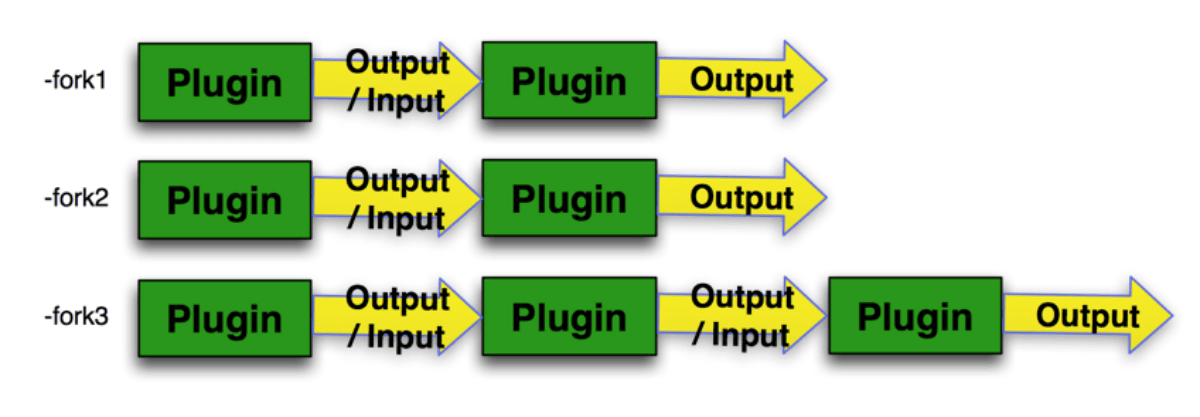
Key points about forks:
- A pipeline may contain many forks (sub-pipelines).
- Each fork runs in its own thread, so independent forks execute in parallel.
- If your pipeline has only a single chain, you do not need
-forkat all.
./run_pipeline.pl \
    -fork1 -importGuess mdp_genotype.hmp.txt \
    -fork2 -importGuess mdp_phenotype.txt
Connecting forks: -input and -combine
Forks become powerful when you feed one fork's output into another. Two flags control this:
| Flag | Meaning |
|---|---|
-input<id> |
Use the output of fork <id> as input to the plugin before this flag |
-combine<id> |
Start a new fork whose job is to combine several inputs into one |
-inputOnce<id> |
Like -input, but the value is reused every iteration of a -combine |
When combining datasets, tell TASSEL how to join them by taxa:
-intersect— keep only taxa present in all inputs.-union— keep taxa present in any input.
For example, -combine3 -input1 -input2 -intersect starts fork 3, pulls in the
outputs of forks 1 and 2, and intersects them into a single dataset.
Correct vs. incorrect usage
-input<id> must follow either a plugin or a -combine flag. A couple of
common mistakes:
Incorrect
Correct
Worked example: GLM
This pipeline runs a General Linear Model (GLM) association analysis. It loads genotypes and phenotypes in separate forks, intersects them by taxa, fits the model, and exports the results.
./run_pipeline.pl \
    -fork1 -importGuess mdp_genotype.hmp.txt \
        -FilterSiteBuilderPlugin -siteMinAlleleFreq 0.01 -endPlugin \
    -fork2 -importGuess mdp_phenotype.txt -excludeLastTrait \
    -combine3 -input1 -input2 -intersect \
        -FixedEffectLMPlugin -endPlugin \
    -export glm_output
Step by step:
| Segment | What it does |
|---|---|
-fork1 -importGuess mdp_genotype.hmp.txt |
Load the genotype table |
-FilterSiteBuilderPlugin -siteMinAlleleFreq 0.01 -endPlugin |
Drop sites with minor allele frequency below 1% |
-fork2 -importGuess mdp_phenotype.txt -excludeLastTrait |
Load phenotypes, dropping the last column |
-combine3 -input1 -input2 -intersect |
Combine forks 1 and 2, keeping shared taxa |
-FixedEffectLMPlugin -endPlugin |
Fit the GLM |
-export glm_output |
Write the results |
Worked example: MLM
A Mixed Linear Model (MLM) analysis additionally incorporates population structure and a kinship matrix. Each input is loaded in its own fork, then combined:
./run_pipeline.pl \
    -fork1 -importGuess mdp_genotype.hmp.txt \
        -FilterSiteBuilderPlugin -siteMinAlleleFreq 0.05 -endPlugin \
    -fork2 -importGuess mdp_traits.txt \
    -fork3 -importGuess mdp_population_structure.txt -excludeLastTrait \
    -fork4 -importGuess mdp_kinship.txt \
    -combine5 -input1 -input2 -input3 -intersect \
    -mlm -mlmVarCompEst P3D -mlmCompressionLevel Optimum \
        -input4 -export mlm_output
The genotype, trait, and population-structure forks are intersected by taxa in
fork 5, then that combined phenotype dataset plus the kinship matrix (fork 4)
are passed to -mlm.
Note
Older tutorials used -runfork1 -runfork2 ... at the end of the command.
This is no longer required — TASSEL runs the necessary forks automatically.
Runtime options
Heap size
Large datasets may need more memory than the default. Set the initial (-Xms)
and maximum (-Xmx) Java heap size at the start of the command:
Logging
Send standard or debug logging to the console or to a file:
XML configuration files
Long pipelines can be stored as XML instead of a single command line:
# Run a pipeline defined in an XML config file
./run_pipeline.pl -configFile config.xml

# Create an XML config from command-line flags (does not run the pipeline)
./run_pipeline.pl -createXML config.xml -fork1 ...

# Translate an XML config back into command-line flags
./run_pipeline.pl -translateXML config.xml
Next steps
- TASSEL 5 Pipeline (CLI) — complete flag reference.
- GBSv2 Pipeline — genotyping-by-sequencing pipeline.
- TASSEL Tutorial Datasets — download the
mdp_*sample files used above.