Project Architecture
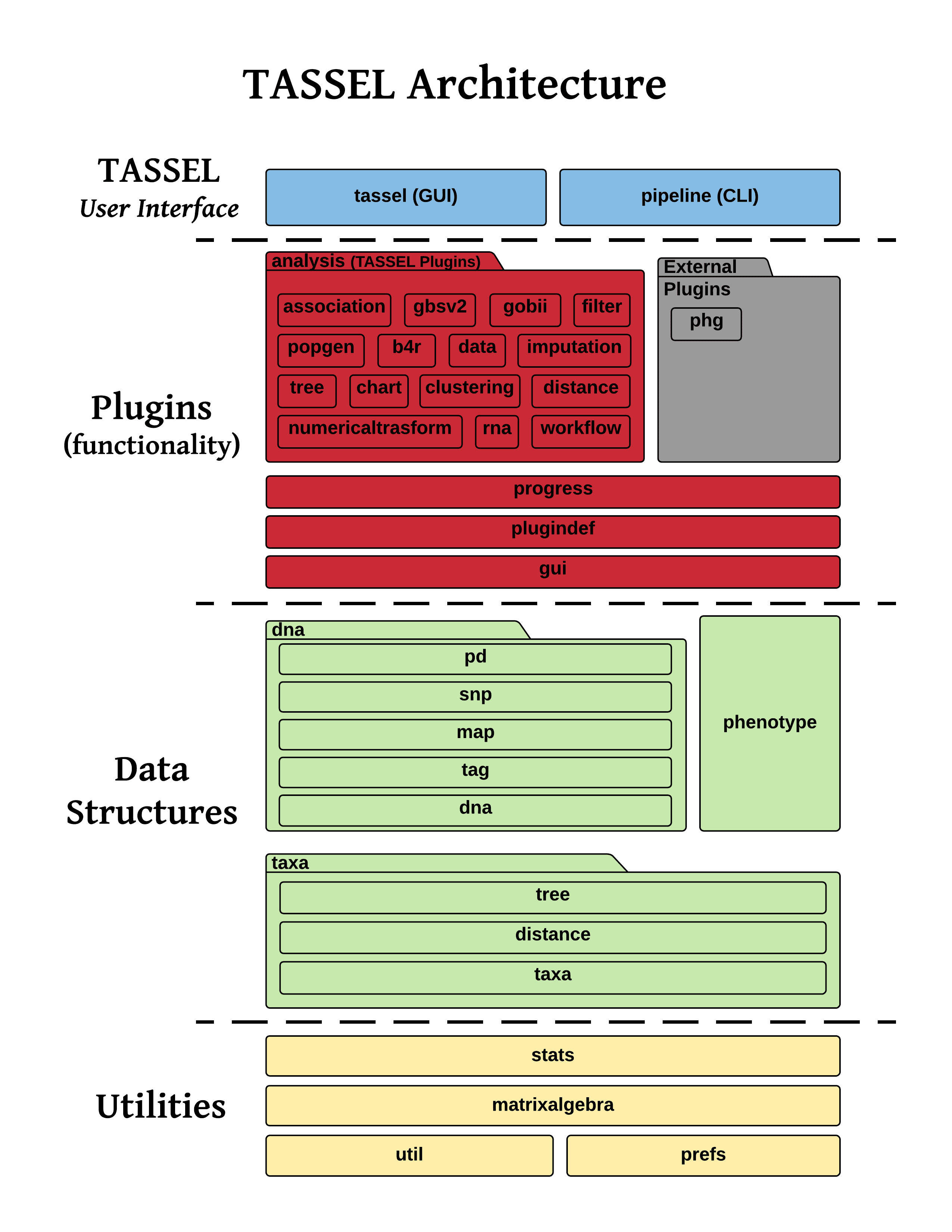
TASSEL is organized as a single Gradle module whose source lives under the
net.maizegenetics package. Functionality is exposed through composable
plugins that can be driven either from the Swing GUI or from the
command-line pipeline.
Source layout
tassel/
├── build.gradle.kts          # Gradle build configuration
├── settings.gradle.kts       # Gradle settings (root project name)
├── gradlew / gradlew.bat     # Gradle wrapper
├── scripts/                  # start_tassel / run_pipeline launcher scripts
├── docs/                     # MkDocs documentation site (this site)
└── src/
    ├── main/java/net/maizegenetics/   # main source (Java + Kotlin)
    └── test/java/net/maizegenetics/   # unit & integration tests
Top-level packages
All production code lives under src/main/java/net/maizegenetics/:
| Package | Responsibility |
|---|---|
plugindef |
The plugin framework — Plugin, AbstractPlugin, PluginParameter, DataSet, Datum, and code generators. The backbone of TASSEL's extensibility. |
pipeline |
The command-line pipeline (TasselPipeline) that parses -fork/-input/-combine directives and chains plugins together. |
tassel |
The Swing desktop application, including TASSELMainApp (the GUI entry point). |
analysis |
The bulk of TASSEL's analytical functionality, grouped into sub-packages (see below). |
dna |
Genotype/DNA data models — genotype tables, SNPs, positions, maps, tags, and their I/O. |
phenotype |
Phenotype data models (attributes, traits, phenotype tables). |
taxa |
Taxa lists, taxa metadata, distance matrices, and trees. |
stats |
Statistical machinery — linear models, PCA, and general statistics utilities. |
matrixalgebra |
Matrix abstractions with EJML and native BLAS (JNI) backends. |
gui |
Reusable Swing widgets and dialogs. |
chart / progress |
Charting components and progress reporting. |
prefs |
User preferences. |
util |
Shared utilities used across the codebase. |
The analysis sub-packages
net.maizegenetics.analysis is where most user-facing capabilities live:
| Sub-package | Contents |
|---|---|
association |
GLM, MLM, fast multithreaded association, EQTL. |
modelfitter |
Stepwise additive model fitting. |
distance |
Kinship and distance matrices (centered/normalized IBS, A-matrix, dominance). |
popgen |
Population-genetics analyses (LD, diversity). |
imputation |
FILLIN, FSFHap, and numerical imputation methods. |
numericaltransform |
Numerical genotype/phenotype transforms and imputation-by-mean/kNN. |
filter |
Site/taxa/trait filtering plugins. |
data |
Import/export, merge, separate, and other data-management plugins. |
tree |
Tree building and the Archaeopteryx viewer. |
clustering |
Clustering analyses. |
chart |
Result plots (Manhattan, QQ, LD, charts). |
gbs, gbs/v2, gbs/repgen |
Genotyping-by-sequencing pipelines. |
phg, rna, avro, gobii, monetdb, b4r |
Integrations and specialized workflows. |
The plugin model
Nearly every operation a user can perform is implemented as a plugin that
extends net.maizegenetics.plugindef.AbstractPlugin. Plugins:
- Declare their inputs and configuration as self-describing
PluginParameterfields. This single declaration drives both the GUI dialog and the command-line flags — there is no separate CLI parser per plugin. - Implement
processData(DataSet input)to do their work, receiving and returning aDataSet. - Are chained together by the
pipelinepackage (for CLI use) or invoked from the GUI intassel.
The unit of data exchange between plugins is a DataSet, a collection of
Datum objects that each wrap a typed payload (for example a GenotypeTable, a
Phenotype, or a DistanceMatrix) plus a name and comment.
To write your own plugin, see Developing Plugins.
GUI vs. pipeline
The same plugins power two front-ends:
- GUI —
net.maizegenetics.tassel.TASSELMainAppis the desktop application entry point (also themainClassfor./gradlew run). PluginPluginParameters are rendered as dialog fields. - Pipeline (CLI) —
net.maizegenetics.pipeline.TasselPipelineparses a command string, instantiates plugins non-interactively, wires their inputs and outputs via-fork/-input/-combine, and runs them.
Because both front-ends share the same plugin code, an analysis available in the GUI is generally available on the command line as well.